
Struckd Alternative on iPad, hyperPad Game Maker

Struckd Shut Down. Here’s How to Keep Creating Games on Your iPad
If you used Struckd to turn game ideas into playable experiences, its shutdown does not have to end your creative momentum.
Struckd announced that the platform would shut down on August 1, 2026. That leaves many creators asking the same question:
Where can I continue making games without abandoning mobile creation or learning traditional programming?
If you own an iPad and want to create 2D games using visual code, hyperPad is a strong next step. It is a complete game-development platform designed specifically for iPad—not a desktop editor squeezed onto a touchscreen.
With hyperPad, you can visually design scenes, connect gameplay logic, import original artwork and audio, test changes instantly and develop a complete 2D game from your iPad.
This guide explains what changes when moving from Struckd, what hyperPad can do and how to start rebuilding your ideas.
Important: hyperPad does not directly import Struckd projects and is not a like-for-like 3D replacement. It is best suited to creators who want to translate their ideas into original 2D games and interactive experiences.
What happened to Struckd?
Struckd’s official app and web studio announced an August 1, 2026 shutdown. The platform had given creators a visual way to assemble 3D worlds, apply custom logic and share games with its community. View the official Struckd notice.
Struckd also offered a Unity exporter, but its documentation stated that not every Struckd feature or asset was supported. Unsupported assets could be substituted with alternatives or placeholders during export. Read Struckd’s exporter limitations.
If you exported a game to Unity, preserve those files and follow Unity’s documentation for continued development. If you want a more approachable, iPad-first workflow, consider rebuilding the game’s core idea as a 2D project in hyperPad.
Is hyperPad a good Struckd alternative?
hyperPad is a good fit for a specific group of former Struckd creators:
- You have an iPad running iPadOS 14 or later.
- You want to make 2D games rather than continue with 3D development.
- You prefer visual code over a traditional programming language.
- You want to design and test directly on your iPad.
- You want control over your own graphics, music and sound effects.
- You may eventually want to publish an independent iOS game.
According to the hyperPad FAQ, the engine requires no previous coding experience. It uses a drag-and-drop Behavior system to create game logic without writing conventional code.
hyperPad Starter provides a free way to evaluate that workflow before moving to the full engine. The current Starter page says creators can make up to three games, although product limits can change; confirm the latest allowance in the app before planning multiple projects.
Struckd and hyperPad: the important differences
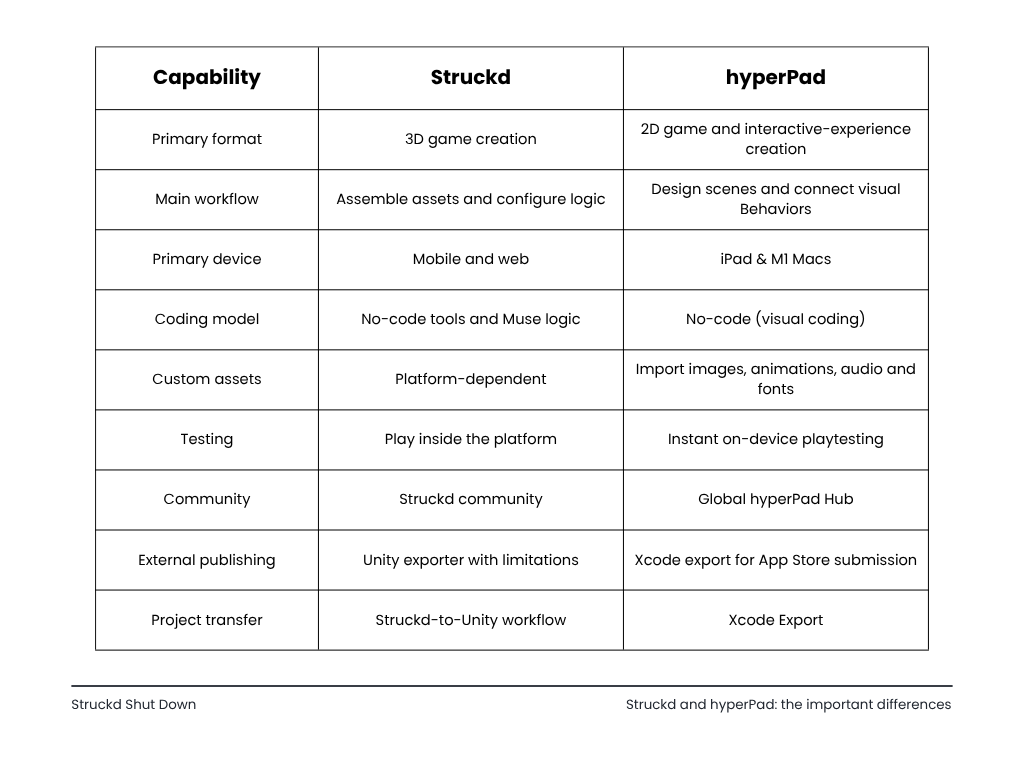
The biggest adjustment is dimensional: a Struckd environment cannot simply be opened inside hyperPad. Instead, you reinterpret the game’s essential mechanics—movement, objectives, scoring, enemies and progression—as a 2D experience.
That limitation can also be creatively useful. A large 3D concept may become a focused platformer, top-down adventure, puzzle game or side-scrolling action game.
What can you create with hyperPad?
hyperPad is designed for more than simple tap interactions. Its visual system can support complete gameplay loops and interconnected systems.
Possible projects include:
- Platformers
- Top-down adventures
- Puzzle games
- Rhythm games
- Arcade and endless-runner games
- Interactive stories
- RPG systems
- Physics-based games
- Educational experiences
- Simulations
- Real-time multiplayer projects
- App and game prototypes
The hyperPad documentation includes tutorials for artificial intelligence, multiplayer with Socket.io, pathfinding, weapons, in-app purchases and analytics.
1. Design levels with a visual scene builder
The scene editor is where you arrange the playable world.
You can:
- Place and resize objects
- Organize content into layers
- Build multiple scenes
- Create reusable overlays for menus and game-over screens
- Set scene backgrounds
- Import or select visual assets
- Design interfaces and controls
- Preview the game on the same device
Scenes can represent levels, menus or distinct areas of a game. Overlays can hold interfaces that appear above them, such as a pause menu, inventory screen or results panel.
For larger projects, hyperPad can preload scenes or overlays so transitions feel faster. The documentation recommends balancing preloading against memory and performance requirements. Learn about scene preloading.
2. Create gameplay with visual code
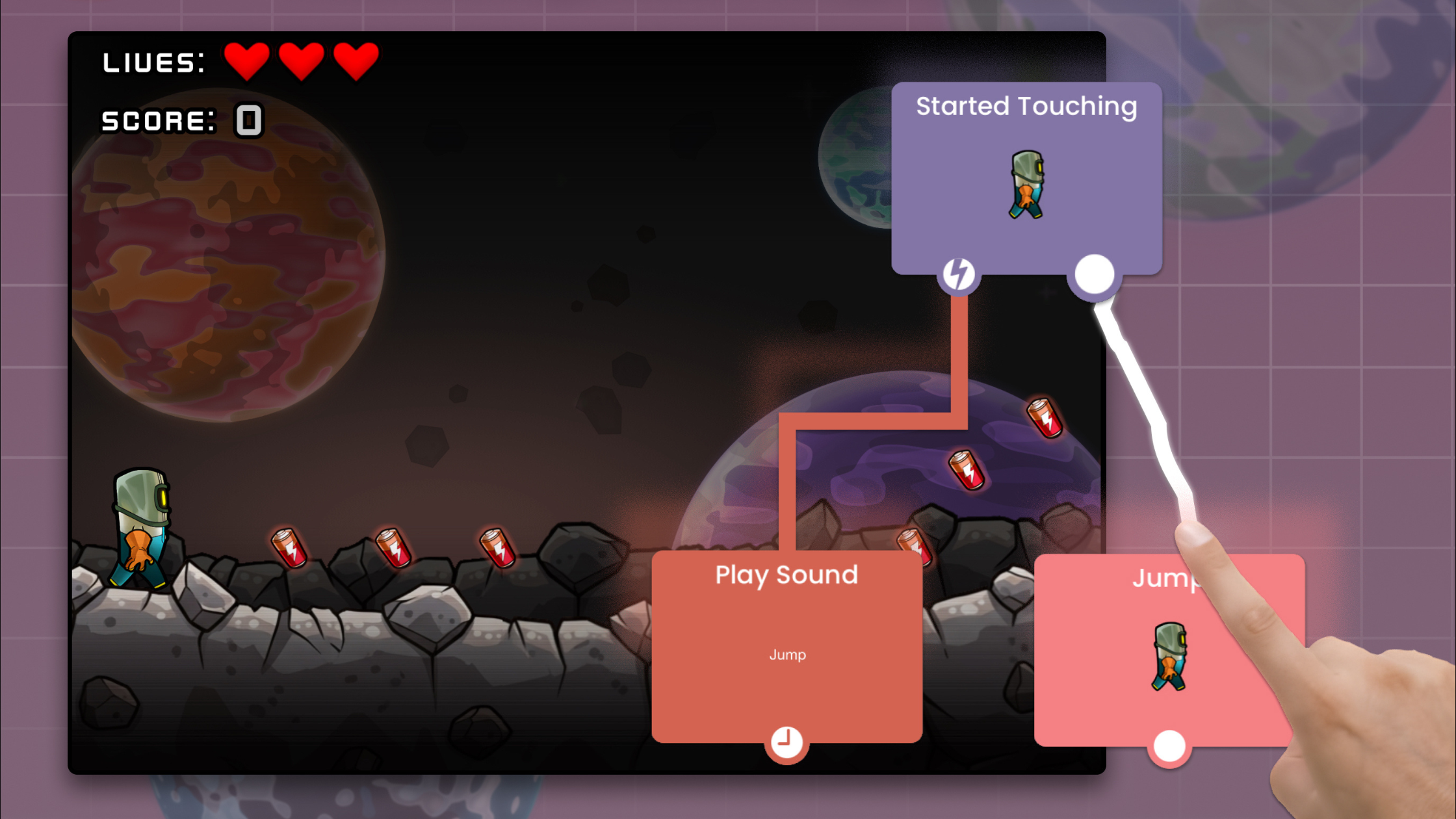
hyperPad uses Behaviors instead of traditional source code.
Its basic structure is:
Event → action → result
For example:
Player touches Jump → apply upward force → character jumps
Or:
Player collides with enemy → subtract health → update health bar
Behaviors appear as connected visual nodes. You can inspect how events and actions flow through the game without reading a text-based programming language.
Common Behavior categories cover:
- Touch, swipe, joystick and keyboard input
- Physics and forces
- Movement and transformation
- Collisions
- Animation
- Scene and overlay control
- Logic and conditions
- Values, arrays and dictionaries
- Saving and loading data
- Audio
- Networking
- Messages between game systems
The official Tappy Plane tutorial demonstrates how events and actions work together to create touch controls, physics, collisions, scoring, spawning, saved high scores and a game-over state. Follow the Tappy Plane visual-coding tutorial.
3. Add physics without programming a physics engine
hyperPad includes built-in tools for gravity, collisions, forces and physics objects.
This allows you to create mechanics such as:
- Jumping
- Falling platforms
- Projectiles
- Knockback
- Destructible objects
- Physics puzzles
- Bouncing objects
- Vehicle-inspired movement
- Object dragging
- Collision-triggered events
You still control how these systems behave. For example, you can change gravity, apply forces, set velocity or respond to specific collisions using connected Behaviors.
This offers a useful middle ground: the physics engine handles simulation while visual logic controls the game rules.
4. Import your own artwork, animation and audio
Former Struckd creators may be especially concerned about creative ownership and customization. hyperPad lets you bring original assets into a project instead of limiting every game to a fixed catalog.
Supported content includes:
- Individual images
- Transparent PNG graphics
- Animation frames
- Sprite sheets
- Custom fonts
- Particle assets
- Sound effects
- Music
The documentation recommends PNG for high-quality artwork requiring transparency. Audio support includes common iOS-compatible formats such as MP3, M4A, WAV and AIFF. Review supported asset types.
This makes hyperPad particularly useful for artists working in Procreate or other iPad creative apps. You can draw a character, export it and incorporate it into a playable project on the same device.
Only use assets you created or have permission to reuse. Do not extract or republish proprietary Struckd assets without explicit authorization.
5. Test gameplay immediately
Traditional development often separates editing, compiling and device testing. hyperPad is built around rapid on-device iteration.
A practical workflow is:
- Change a scene or Behavior.
- Tap play.
- Test the mechanic.
- Return to the editor.
- Adjust and repeat.
This short feedback loop is valuable when tuning movement, difficulty, physics and touch controls. It also makes the platform more approachable for creators who previously enjoyed Struckd’s immediate, visual workflow.
6. Save and back up your work
Projects are continuously saved while you work, and remaining changes are saved when you exit through the Project menu. If Cloud Backups are enabled, exiting also initiates a backup upload. See the Project Menu documentation.
Automatic Cloud Backups are enabled by default when creating a compatible new project. hyperPad’s documentation says a basic account receives 500 MB of backup storage, while eligible upgraded accounts receive more. Learn about Automatic Cloud Backups.
Before building anything substantial:
- Confirm Cloud Backups are enabled.
- Exit projects through the proper menu.
- Check that backups appear in your account.
- Keep original art and audio in a separate location.
- Maintain additional copies of important project assets.
Do not treat a single device as your only archive.
7. Share games and gather feedback
The hyperPad ecosystem includes the hyperPad Hub, where creators can share projects and explore games made by the community.
Community feedback can help you answer questions such as:
- Are the controls understandable?
- Is the first level too difficult?
- Can players identify the objective?
- Does the game perform well?
- Which mechanics deserve expansion?
If you are starting over after Struckd, begin with a small prototype and use feedback to guide the rebuild. Recreating every feature immediately is usually less effective than proving the core game loop first.
8. Publish an iOS game
The full version of hyperPad supports exporting projects for App Store distribution. hyperPad says creators own what they make, keep their royalties and do not owe the platform a revenue share. Confirm current commercial terms before release. Review the hyperPad FAQ.
Publishing is a separate process from building the game. The official guide covers:
- Registering for the Apple Developer Program
- Creating an App ID
- Creating a distribution profile
- Setting up the App Store listing
- Configuring the build
- Archiving and submitting through Xcode
The documented workflow generally assumes access to a Mac for Xcode. If you do not have one, hyperPad advises contacting its team to discuss available options. Read the App Store publishing introduction.
How to rebuild a Struckd game as a 2D hyperPad project
There is no automatic migration, so treat the transition as a structured redesign.
Step 1: Identify the game’s essential idea
Do not begin by copying the entire environment. Write down:
- What does the player do repeatedly?
- How does the player win?
- How does the player lose?
- What creates challenge?
- What progression keeps the game interesting?
- Which feature makes it distinctive?
For a Struckd racing game, the essential idea might be avoiding hazards and reaching checkpoints before time expires. That can become a top-down 2D racer.
A 3D exploration game could become a top-down adventure. A combat arena might become a side-view action game.
Step 2: Choose the correct 2D perspective
Common options include:
- Side view: Platformers, runners and action games
- Top-down: Racing, RPGs, mazes and exploration
- Fixed-screen: Puzzles, arcade games and simulations
- Interface-led: Strategy games, interactive stories and management games
Choose the perspective that preserves the central experience with the least unnecessary complexity.
Step 3: Build one playable scene
Start with:
- One player
- One objective
- One obstacle or enemy
- One win condition
- One lose condition
- A restart option
A complete one-minute game loop teaches you more than five unfinished levels.
Step 4: Translate mechanics into Behaviors
Break each mechanic into an event and an action.
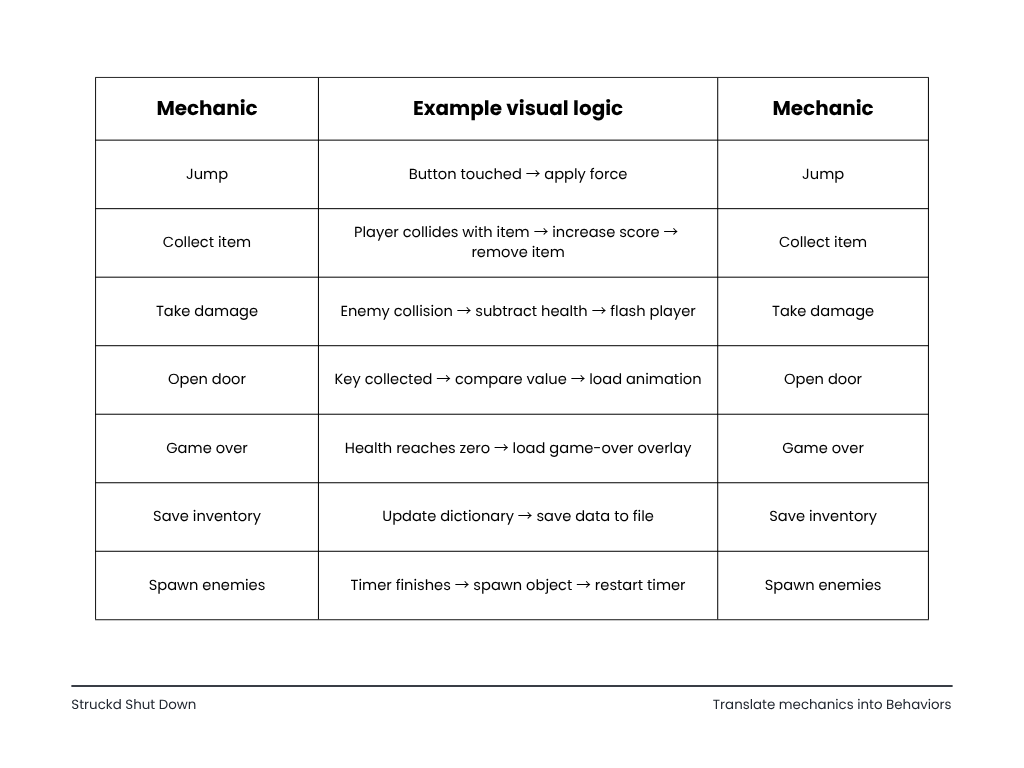
hyperPad’s Dictionary Behavior can store keys and values, making it suitable for systems such as inventories. Its output can be passed to a Save to File Behavior to preserve the complete collection. Read the Dictionary documentation.
Step 5: Import only assets you own
Prepare your own:
- Character sprites
- Backgrounds
- Interface elements
- Animation frames
- Music
- Sound effects
If original Struckd assets were replaced with placeholders during Unity export, do not assume that grants permission to reuse the original visual content elsewhere.
Step 6: Test the core loop
Ask a new player to try the game without instructions. Observe where they hesitate or fail.
Improve:
- Control responsiveness
- Visual feedback
- Objective clarity
- Difficulty progression
- Restart speed
- Performance
Step 7: Expand carefully
Only after the central loop is enjoyable should you add:
- More levels
- Additional enemies
- Inventory systems
- Saved progress
- Effects and particles
- Multiplayer
- Monetization
- App Store preparation
Which hyperPad app should former Struckd creators download?
hyperPad currently offers different entry points.
hyperPad Starter
Best for creators who want to evaluate visual 2D development for free.
Use it to:
- Learn the scene editor
- Explore Behaviors
- Build a first prototype
- Test whether the workflow suits you
hyperPad Hub
Best for playing community projects, finding inspiration and seeing what other creators have built. It is a discovery experience rather than the primary creation tool.
hyperPad (Complete)
Best for creators who want the complete engine, additional project capacity and App Store export. The current full app is sold as a one-time purchase rather than a subscription, but always verify pricing and included features on the App Store before purchasing.
Frequently asked questions
Can hyperPad import my Struckd game?
No. hyperPad does not offer direct Struckd project import. Rebuild the concept as an original 2D project using assets you own.
Is hyperPad a 3D game engine?
hyperPad is primarily a 2D game-development engine. It is not a direct replacement for Struckd’s 3D world builder.
Do I need to know how to code?
No traditional programming experience is required. hyperPad uses connected visual Behaviors to represent events, actions, conditions and data.
Can I make a complete game on an iPad?
Yes. You can design scenes, create logic, import assets and playtest from an iPad. App Store submission introduces additional Apple requirements and normally involves Xcode.
Can I use my own art and music?
Yes, provided the files use supported formats and you own or have permission to use them.
Can I publish my game on the App Store?
The full version supports export for iOS distribution. You must also meet Apple’s developer, technical and review requirements.
Can I make multiplayer games?
hyperPad includes networking capabilities, and its documentation provides a Socket.io multiplayer tutorial. Multiplayer adds server, synchronization, security and testing complexity, so beginners should first complete a single-player prototype.
Is hyperPad Starter free?
Yes. Starter is intended for learning and evaluation, with usage restrictions. Check the current app listing for exact project and feature limits.
Your Struckd experience still matters
Starting with a new engine does not mean starting from zero.
If you built games in Struckd, you already practiced valuable skills:
- Level design
- Gameplay balancing
- Player motivation
- Environmental storytelling
- Visual composition
- Testing
- Iteration
- Community feedback
The tool is changing, but those skills transfer.
hyperPad will not reproduce every part of Struckd. What it can offer is a focused new direction: creating original 2D games directly on an iPad using visual code.
Start with one mechanic. Build one scene. Make it playable. Then expand.
Your previous platform may be gone. Your next game does not have to be.